Showing posts with label wide. Show all posts

Wednesday, 24 November 2010

3 Column BYO background

Yes, some people asked for it, so here is BYO Background in a 3 column version! Hip hip hooray.

If you're new to this template please read this post about the 2 column version.

In a nutshell: this template is a blank canvas and with a few edits you can fully customise the colour of the header and the background image and it can be easily transformed into something like this......


click above for a live preview


FYI I have used a background from Ollibird and the header image is the 'LightSalmon' header.
The template does not come like this, you have to bring your own background, hence the BYO title.


Coming soon.... a tutorial on how to change the text of the blog header with the Google Font Directory (good idea!)

Friday, 29 October 2010

Hello, Yellow!

Ok, I like the photo blog idea so I made another one with the same basic layout as 'Say Cheese!' but this is brighter with a header image by the ultra talented Pixels & Ice Cream.

Enjoy!


click above image to view a live preview

Saturday, 23 October 2010

Say Cheese! (the perfect template for a photo blog!)

Now I know this template preview (below) is going to look like all hamburger but in actual fact it's a very neat super wide Blogger template perfect for a photoblog!

The maximum sized photo I would recommend is 900 pixels (as the template itself is not much wider) but if you click through to the test blog you will see that I have put a few example images in there so you can see how they look.

Obviously I don't recommend uploading your photos on Blogger (because they can be re-sized too small and look kinda crap in this super wide template). I would opt for using Photobucket or Flickr pics here. Then you'll know that they'll be very clear!

Oh, and the sidebars (3) are actually in the footer of the blog. I like it!


click above image for a live preview

Saturday, 9 October 2010

Rain Rain Go Away - Stripey subtle template

Woo, this is a pretty one! I love it! It's striped, it's subtle colours, it includes a vintage illustration. What more could you want?

Hope you like it....


click for a live preview

Saturday, 2 October 2010

Keep Dreaming - 2 Column baby blue template

Hi there! It's been a while since I had time to make templates but I hope to have them out on a more regular basis (because I love making them). This is one that I adore - and hope you do too! I don't even really like birds all that much, but I love this shade of blue and I also love a good silhouette.

Also, click on the live preview below to see the little guy between each post ;)


click above for a live preview

Saturday, 18 September 2010

Mode Parisienne 3 Columns

Here's a 3 column version of the Mode Parisienne template (2 column template here).

Please note that if you want to edit the included blank header to include your own header text, then please feel free to do so. The blank header image is included in the zipped folder.

Information on how to create (and then add) your own header image, follow these instructions. Otherwise, the template below just comes generically with a plain text image.


click for a live preview


If you are interested in this but 2 columns instead of three, check out this template here.

Saturday, 26 June 2010

Pretty Fly (for a butterfly) - 3 column pretty pink template

Hello! I have been incredibly busy of late and haven't had a lot of spare time for blogger designs. Sorries :( How cool is it that I now have over 2,000 Google followers now though?

Gosh, I cannot thank you enough. Really. Thank you!

I do have quite a few in the works however and that means if I get my act together then maybe I can get them finished. Anyhow, onto more pink gradient-type matters like this template below. So pretty and pink and has a butterfly (thanks to Jen at Pixels & Ice Cream). I know a lot of people want 3 column templates so I hope someone likes it.


click above for a live preview

Saturday, 22 May 2010

Slugs & Snails - Cute Little boy template

I have two little boys so I can confirm that they are indeed made from slugs and snails. This template is kind of simple but very sweet and I love love love this shade of blue. Anyway, I hope you like it too.


click for a live preview

Friday, 16 April 2010

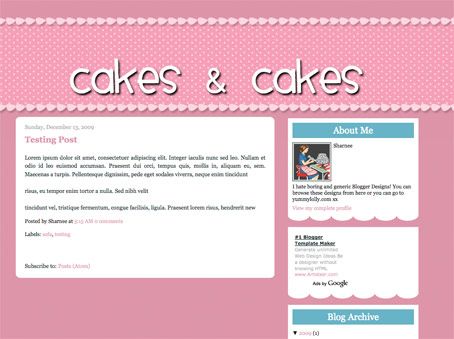
Cakes & Cakes - 2 Column Template - why not make your own funky header?


click for a live preview

If you want to make your own header, go right ahead (you should make a transparent PNG file). I made an example that you can see how it may look here:


Make my own header?

To successfully make your own header, follow the following guides:
  • Make the header a transparent .png file (so you can see the spotty bg behind it)

  • You can make transparent pngs with my favourite online image editor Pixlr (yes, it's FREE and quite comparable to Photoshop).

  • You want to allow about 100px to 150px transparent "padding" above the text (within in the image I'm talking) so that it's going to be aligned within the spotty bit. If you don't put this padding in and try to insert the header image, it's not going to be in the right place and will look WEIRD! I hope that makes sense, leave me a comment if it doesn't and I'll try to explain more.

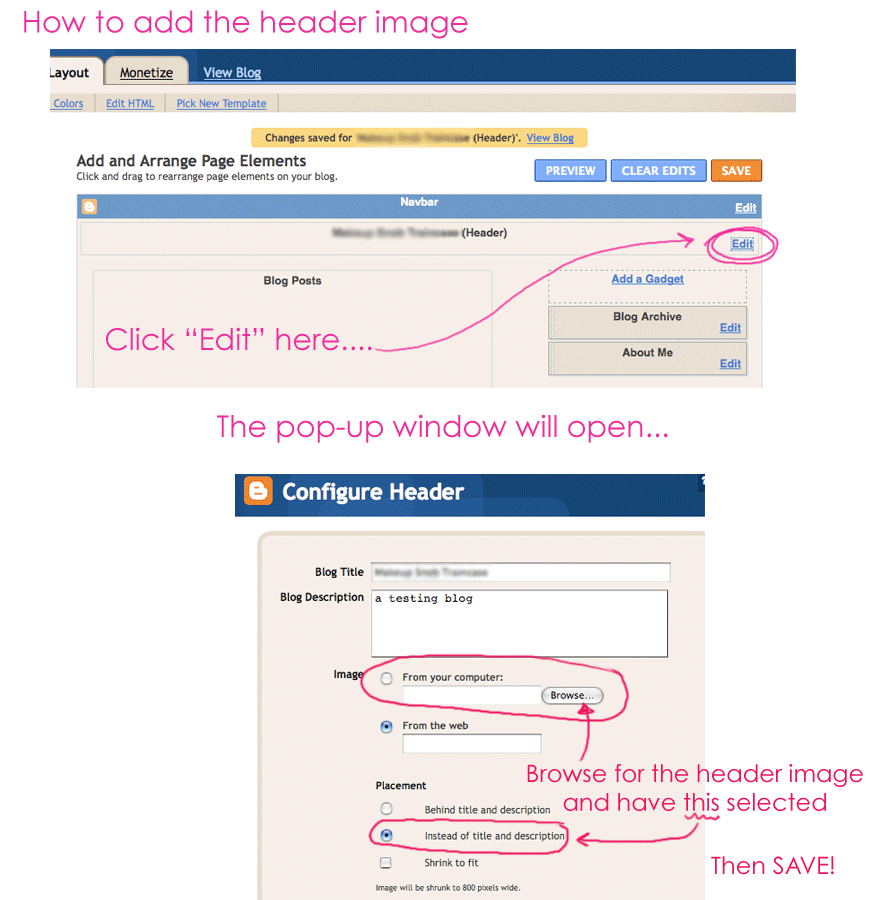
  • As always, upload your header image by clicking on: LAYOUT > PAGE ELEMENTS and then clicking "Edit" in the header area. You want to upload your header image, but ensure you DON'T HAVE "shrink to fit" selected. Also make sure you HAVE "instead of title & description" selected.
Click here for visual instructions (much easier to understand). Enjoy.

Friday, 2 April 2010

Mint, Latte & Pink versions of "Oh!" She Said!

Alrighty alrighty!

I do love the last blogger template I made - "Oh!" she said and I have now made it in three different colour combinations: Mint, Latte & Pink!

I haven't made a live preview blog to view how these look, but you can see the previous {yellow} one here.

Enjoy!


Remember that if you want the date to show up as "Friday April 2, 2010", you'll have to go to to SETTINGS > FORMATTING under the menu tabs and then selecting the 'Date Header Format to be the same as below:


Saturday, 27 February 2010

Vine Me Up & Down Blogger template

Apologies for not posting many templates recently! Ahh, I have been SO BUSY! Here is one I have had up my sleeve for a while. It has a flowery frame at the top and bottom of the main blog area which makes it ultra pretty! Hope you like it! xx


PS: Have you seen the comments section of this blog? I have changed it up so the comments are numbered and with a little image between each post! Soon I will write out a tutorial for you to do similar!

Saturday, 13 February 2010

Hey Pretty Lady! - XML blogger template

Before I post the template I just want to let you know about this post (incase you haven't read it yet) which has something to do with keeping your widgets when you change templates! YES IT IS NOW POSSIBLE! Read about it here.

I am trying to get my head around how this may affect my templates when you upload them. Is it possible for me to make my templates with no sidebar and "main blog" data? I have no idea. But if you have any problems, please let me know and I'll try and figure out what the best way of making my templates is. Urgh, I have a feeling things might go a little crazy.

Anyhoo...

Here's another pin up girl template! Weee, I really could look at pin up girls all day (they are so pretty!). This template is wide - 950px to be exact - and it's one I've been meaning to post for a while. I hope you like it.


Sunday, 10 January 2010

Flower, not the Universe - XML template 3 columns

Have you ever seen a field of Cosmos? They are so beautiful (even coming from me, not a big fan of magenta/purples). Here we have a stunning 3 column blogger template with cosmos header. It's pretty pretty, if I do say so myself. Hope you enjoy it too! xx


click for a live preview


OH, PS (for those of you on twitter):


Saturday, 9 January 2010

Quite Contrary (of the Mary Mary fame)

Happy new year to you all! Apologies for not posting a template sooner but I had a big, crazy, month full of birthdays, Christmas, new year and then more birthdays! It was kind of crazy!
Here is a template (sorry, I make no apologies about it being deliciously pink) with a background by Ava7Patterns. Also, it's made from transparent pngs - so if you happen to be using IE6 (less than 4% of you, you won't be able to use this one due to transparent pngs looking crappy on IE6, sorry).


click for a live preview


Monday, 7 December 2009

Ta-Da! Free template - 3 column Blogger template

Oh man I'm so behind. I wanted to post some Christmas templates but so far I have only posted the colourful baubles one {view it here} but like I said... I'm so behind. I have been so busy lately that it's not funny! Christmas is just around the corner -- HOW DID THAT HAPPEN? Send all explanations to me, via Santa.
I will have a Christmasy template in the next few days. In the mean time, enjoy this:


click for a live preview


Please back up your widget data before installing a template!

Sunday, 6 December 2009

Dandy - XML blogger template

Here is a template with a dark (black) background with a beautiful dandelion image. You can change the red header text to be whatever colour you want but I thought the red suited the yellow quite well.


click for a live preview


Please back up your widget data before installing a template!

Thursday, 26 November 2009

Laci-Maree XML blogger template

OK, one more pin-up girl template (I promise no more for a while, unless of course you like them!). I know that not everyone likes pin-up girls like I do - and let's face it, they may not be perfect for every blogger, so I have also made it without pin-up girl

WITH PIN-UP GIRL:

click for a live preview


WITHOUT PIN-UP GIRL:
The header text is centred and there is no image. Download below:


Please back up your widget data before installing a template!

Monday, 12 October 2009

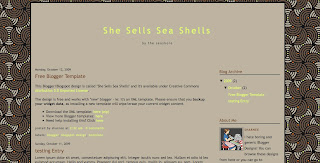
She Sells Sea Shells - XML template

Ahh, another lovely pattern from Pattern Cooler - seriously, go there now for the best patterns you've seen for ages! This background is beautiful and available in many variations (another one of my faves is this green one - a much larger scale than the image I've used in the background here). Ahh, beautiful. Hope you like it :-)


click for a live preview


Please ensure that you backup your widget data, as installing a new template will wipe/erase your current widget content.
  • To download the xml template: click here
  • Preview the site here
  • Need help installing this? Click here

Thursday, 8 October 2009

Opaque Blogger template - XML Template - HIGHLY CUSTOMISABLE (assmuming my instructions make sense!)

Here we have a template that you can use as is, or customise the header (read below for my instructions).  By default the template you download will have a plain text header, so anyone can of course use it.
 
My thoughts are all trying to escape my head at once here, so apologies if the instructions come out slightly garbled.  We have a beautiful wide blogger template that's made of semi-translucent png image files (sorry IE 6 users, you're missing out).

If you install it and use it as it is supplied, it will look like this - ie: it will have a plain text header/description:


click for a larger view


If you would like to use the template as is, download it here:
Download the XML template: here (zip folder)
 
HOWEVER.... if you want to be a little fancier and make your own header image using Photoshop (or similar graphics program), then you can make it look something like the preview site {here}.

Alternatively if you don't know how to make transparent images, they maybe you can make a solid backgrounded header image and the blog could look like this:


click for a larger preview

How do you make your own header image ?


We-ell, first of all I'm going to assume you have Photoshop (or something similar).  You have the option of creating a transparent png or just a normal gif/jpg to insert.  If you chose to go trasparent then you'll need to probably use png24 in Photoshop to make sure the edges are smooth as a baby's bottom.

If you have no idea what I'm talking about, don't worry!

Basically if you want to make your own header image for this blogger template please ensure that the header image is 950px wide for best results.  In the test site {here} my image is 950x193px.  It can be any height you like but 950 is best for width.

OK OK OK, how do I insert this header image I made?

Click on Layout > Page Elements and click on "Edit" in the header area:


(click for a larger view)

Once you click on that, a pop-up window will open:


(click for a larger view)

 Select your image to upload "instead of title and description" and then save.  Done!


SHUTUP LADY and just let me download the freaking template!


Please ensure that you backup your widget data, as installing a new template will wipe/erase your current widget content.
  • To download the xml template: click here
  • Preview the site here
  • Need help installing this? Click here
  •   
    REMEMBER: the template will, by default, come with a plain text header.  Don't worry if you don't want to make a fancy one of your own!

    OMG, WHAT? I don't understand what you're talking about here!


    Sorries.  I guess anyone can use the plain text header template but you're going to have to have a few graphics skillz to make your own header and then insert it.


    PS: Delightful fonts on the test site by Kevin & Amanda <3