Showing posts with label scalloped. Show all posts

Wednesday, 17 August 2011

Notebook Scribbles

Hello strangers - how are you all?

Here we have a scalloped-edged template with a cute paper grid background and loads of cursive scribbles (both in the Pacifico font I have used) and some little embellishments within the design.

I have also included some little sidebar widget "buttons" (buttons without borders!) which you can feel free to use.  You just have to insert these as a "Picture" widget and link to whatever URL you want it to link to!  Any questions, let me know, but it's very straightforward!

I hope you like this one. 


Saturday, 26 February 2011

Blue Love Letter

So yesterday I made you an Orange Love Letter, today it's a Blue Love Letter.  I really like this template, I think it is really sweet and cute and I am enjoying changing the colours.

 
click for a live preview

PSSST!
I would also like to remind everyone that I am on twitter (@yummy_lolly) and that I also offer Premium templates over at suckmylolly.com

Come & say hello!

    Friday, 25 February 2011

    Orange Love Letter (more colours coming soon!)

    Wow, I love this template, I really really like it!  Click here to go and have a look - it's got a delightful scalloped edge with tiny hearts and also a banner for behind the date.

    Isn't it lovely?

    If you like it or use it, let me know - I'd love to see it in action!
    xx

    Friday, 16 April 2010

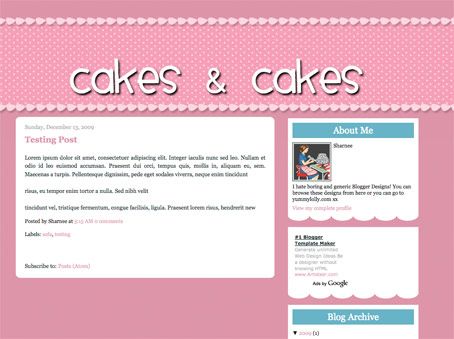
    Cakes & Cakes - 2 Column Template - why not make your own funky header?


    click for a live preview

    If you want to make your own header, go right ahead (you should make a transparent PNG file). I made an example that you can see how it may look here:


    Make my own header?

    To successfully make your own header, follow the following guides:
    • Make the header a transparent .png file (so you can see the spotty bg behind it)

    • You can make transparent pngs with my favourite online image editor Pixlr (yes, it's FREE and quite comparable to Photoshop).

    • You want to allow about 100px to 150px transparent "padding" above the text (within in the image I'm talking) so that it's going to be aligned within the spotty bit. If you don't put this padding in and try to insert the header image, it's not going to be in the right place and will look WEIRD! I hope that makes sense, leave me a comment if it doesn't and I'll try to explain more.

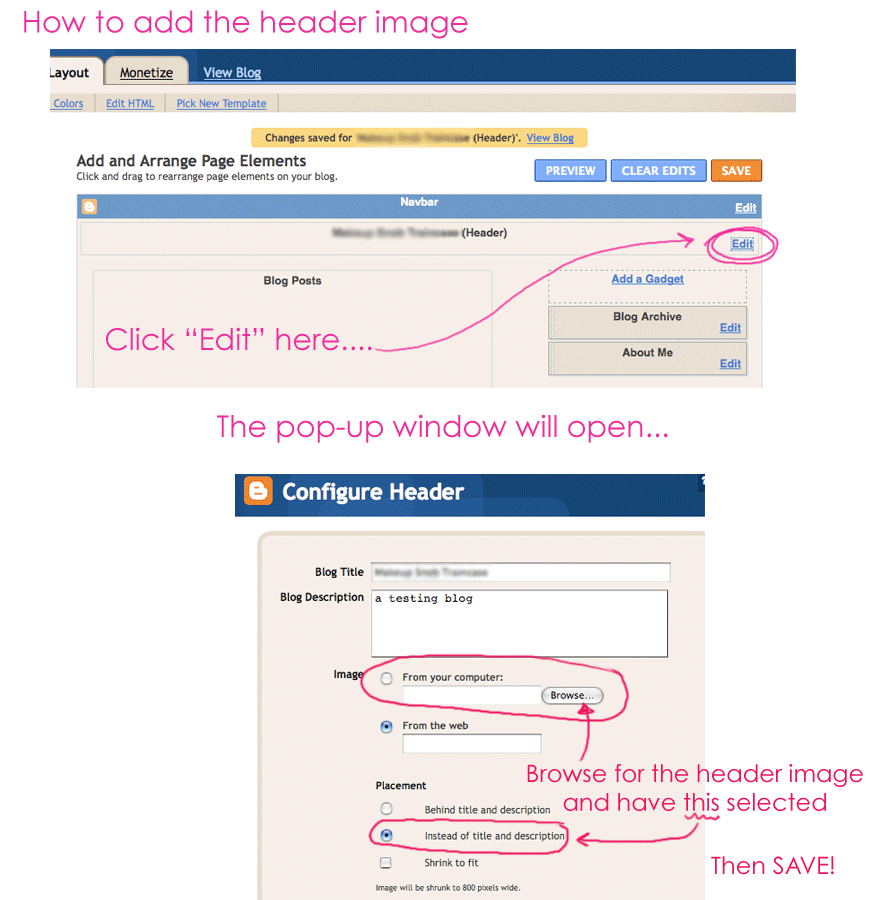
    • As always, upload your header image by clicking on: LAYOUT > PAGE ELEMENTS and then clicking "Edit" in the header area. You want to upload your header image, but ensure you DON'T HAVE "shrink to fit" selected. Also make sure you HAVE "instead of title & description" selected.
    Click here for visual instructions (much easier to understand). Enjoy.

    Tuesday, 24 November 2009

    Frilly Fancy template. Yes, it may slightly resemble underpants.

    I have a few templates to post this week, so please come back and check them out! I hope you like them. Please feel free to leave a comment letting me know if you use my templates or if you like them. I love getting comments {do not bother with the spam or advertising, I'll delete it straight away, der!}.

    This template is delightful. Pink. Blue. Simple patterns yet awesomely feminine. I hope you like it.

    click image above for a live preview


    Please back up your widget data before installing a template!