Showing posts with label spotty. Show all posts

Friday, 21 October 2011

Dotty & Spotty

I was feeling a bit retro-ish today (like most days when I have time to sit down and pick a mood) and this was a template I had in the wings from a couple of years ago that never quite got finished.
It's a dark backgrounded template - which is not something I usually do - but I love the yellow dots, the brown background and the blue highlights.  I hope you like it too! <3

(click above for a live demo)

Download Now

Thursday, 2 June 2011

Spicy Grandma - 2 Column Blogger Template

Here is my first template for my new URL and I hope you like it.  I was actually going to post this template up for download about 30 mins before I realised that my domain was gone (sniff) so I have really been looking forward to sharing this one - I honestly worked quite hard on it.

I hope you like it - perhaps I could make different coloured versions? (which colours do you think would look awesome? Suggestions welcome!).

Saturday, 26 February 2011

Blue Love Letter

So yesterday I made you an Orange Love Letter, today it's a Blue Love Letter.  I really like this template, I think it is really sweet and cute and I am enjoying changing the colours.

 
click for a live preview

PSSST!
I would also like to remind everyone that I am on twitter (@yummy_lolly) and that I also offer Premium templates over at suckmylolly.com

Come & say hello!

    Sunday, 20 February 2011

    Pink Frilly Knickers - 2 Column Template

    So truth be told my knickers are not pink nor are they frilly.  And another truth be told, this template is only slightly frilly and doesn't at all resemble a pair of knickers.

    If the title of this template gets your knickers in a knot then calm down, I promise there are no actual knickers in the template.

    This template is brought to you by the word: knickers.

    In all seriousness, it's simple but it's cute :D Click here to see the test site.

     
    Click for a live preview

    Friday, 16 April 2010

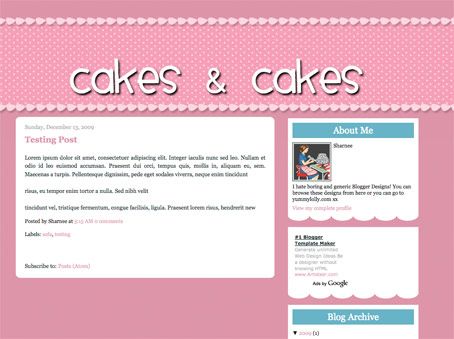
    Cakes & Cakes - 2 Column Template - why not make your own funky header?


    click for a live preview

    If you want to make your own header, go right ahead (you should make a transparent PNG file). I made an example that you can see how it may look here:


    Make my own header?

    To successfully make your own header, follow the following guides:
    • Make the header a transparent .png file (so you can see the spotty bg behind it)

    • You can make transparent pngs with my favourite online image editor Pixlr (yes, it's FREE and quite comparable to Photoshop).

    • You want to allow about 100px to 150px transparent "padding" above the text (within in the image I'm talking) so that it's going to be aligned within the spotty bit. If you don't put this padding in and try to insert the header image, it's not going to be in the right place and will look WEIRD! I hope that makes sense, leave me a comment if it doesn't and I'll try to explain more.

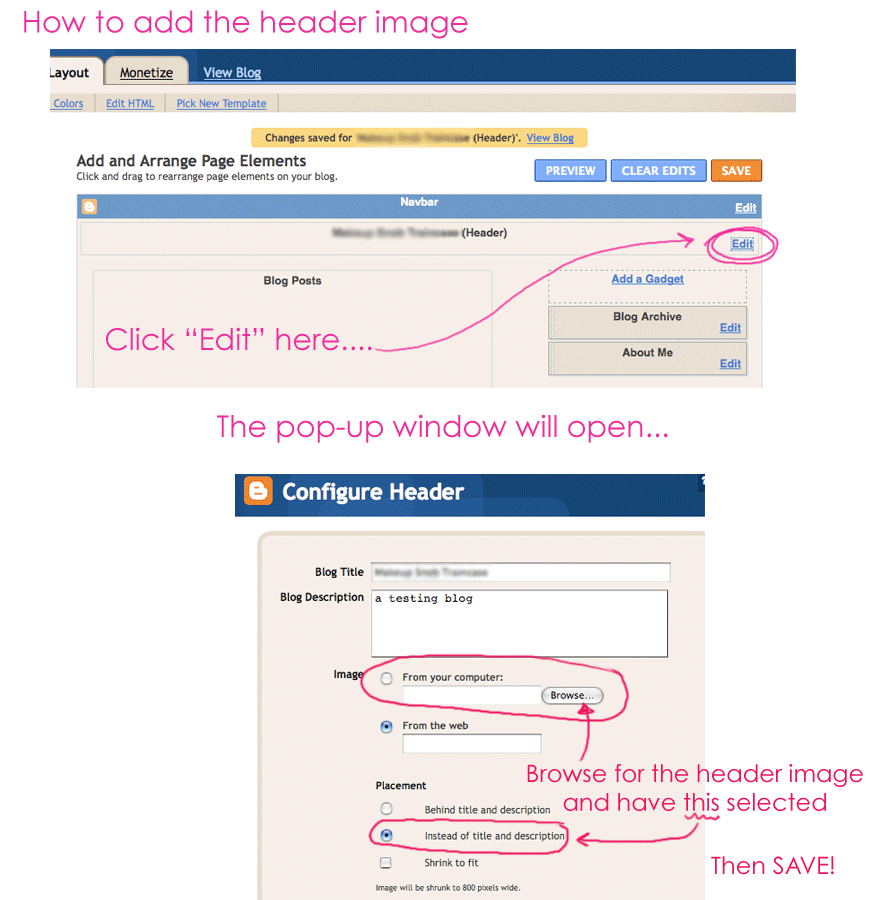
    • As always, upload your header image by clicking on: LAYOUT > PAGE ELEMENTS and then clicking "Edit" in the header area. You want to upload your header image, but ensure you DON'T HAVE "shrink to fit" selected. Also make sure you HAVE "instead of title & description" selected.
    Click here for visual instructions (much easier to understand). Enjoy.