Showing posts with label 2 column. Show all posts

Thursday, 20 February 2014

6th Grade Rebellion - Free 2 column template

I made this template tonight and I really wanted to share it because I thought it was kind of cool and unusual and I thought I better move fast before the chalkboard look is out (or is it out already? NOOOO IT'S NOT!).

And before you say anything - I KNOW that most people don't like darker websites but I don't give a damn (a whiteboard is no where near as rustic and cute as a chalkboard, people!), so here we are:

Click for a live preview


Saturday, 30 November 2013

Pater Pansies - Also, it has been 2 years, I hope you are still out there???

Hello!

Wow, I CANNOT believe I haven't posted anything on this site for 2 years. It's so crazy! Where on earth has time gone? Anyway, who knows where time goes sometimes but I wanted to pop my head back in and see if anyone is still reading this site, if anyone is still visiting and to see if anyone wants free Blogger templates any more? :)

I know that a lot of the hints/tips etc on this site that I wrote years ago are now no longer valid or useful (thanks for changing everything, Blogger) but I am keen to work through them and perhaps focus on offering some really nice free templates.

I have made a template for you today - it's called Peter Pansies and it's cute!
 
Please note that this template comes with a blank header image which means you will have to make this yourself. Your blog title/description will not show up until you edit this image in a graphics program like Photoshop, GIMP or a free online web-based one (I like pixlr! Bonus: it's free!).

For now (until I update this site), you can find installation instructions HERE, and help on installing your header image HERE.  

And if you're new to making your own header image, or don't know how to do that, I have some hints here.

Click to view a live preview site
A couple of random things about this template:
  • The fonts I have used in the test site header image are Esteban for the header and Homemade Apple for the sub-heading. Both are free from google fonts.
    If you like the kind of thing I have made in the test site, you'll be able to re-create it using those fonts too!
  • The background colour is changeable and the pattern will show up regardless!
    To change the background colour, just go to the TEMPLATE tab in Blogger and click on the orange "customize" button. Scroll down to advanced options and you'll be able to change the background colour there. Any questions, let me know.


BUT ENOUGH ABOUT ME!

How are you doing? Is there anyone out there?

Even if you're not interested in this template or today is your first time here -- please leave me a comment to say hello! (please?)

I dare you! :P

Thursday, 13 October 2011

Ivy and the Beanstalk

I wanted to do something kind of simple but elegant and this template came together.  It's not too flashy and it's gentle (well, I think so!).  Subtle.  I like it.

Apologies for not being around much lately - I really have not had a lot of free time :(

Hope you are all well! <3


(click above for a live demo)


Download Now

Saturday, 27 August 2011

roses dans de l'eau - (roses in aqua)

Woah! You are going to LOVE this template!  It's just beautiful - of course the credit there goes to Sarah at Totally Severe who made the stunning background!).

Her site is one of my favourites on the whole internet - NOT EVEN JOKING! - and most definitely one that deserves more appreciation! Her background images are stunning - check them out here.  She did not pay me to say this and she probably thinks I am a mega weirdo for being so in love with her images. But dudes, the girl has talent.


(click above for a live demo)

Wednesday, 17 August 2011

Notebook Scribbles

Hello strangers - how are you all?

Here we have a scalloped-edged template with a cute paper grid background and loads of cursive scribbles (both in the Pacifico font I have used) and some little embellishments within the design.

I have also included some little sidebar widget "buttons" (buttons without borders!) which you can feel free to use.  You just have to insert these as a "Picture" widget and link to whatever URL you want it to link to!  Any questions, let me know, but it's very straightforward!

I hope you like this one. 


Wednesday, 22 June 2011

Purple Powder Room + buttons for your sidebar

Even though this looks quite "pyjama-ish",  I think "Purple Powder Room" is a better name for this.  Kind of subtle yet very very elegant.  It also comes with a few sidebar images/buttons (see below for details).  I think this would be really cute for a wedding blog!


Click for a demo site

This template also comes with some cute sidebar graphics that you can link to your Facebook, Twitter or Photos.  I even have one if you want have a link to an "About Me" or "Contact Me" page.

HOW TO USE THE IMAGES?
You just have to insert the images into your sidebar as a "Picture" widget (no need to 'shrink to fit' and put the URL link to wherever you want it to link to!).

Hope that makes sense!

    Monday, 6 June 2011

    Sing Me a Song, Little Bird

    This is an ultra sweet template with grey colouring and splashes of pink in the text headers and a little bird perched in a tree.  So cute!

    I have also given the template a border around the middle of it - not something you see all the time but I think it's lovely. I hope you like it too :)

    click image for a live demo

    Thursday, 2 June 2011

    Spicy Grandma - 2 Column Blogger Template

    Here is my first template for my new URL and I hope you like it.  I was actually going to post this template up for download about 30 mins before I realised that my domain was gone (sniff) so I have really been looking forward to sharing this one - I honestly worked quite hard on it.

    I hope you like it - perhaps I could make different coloured versions? (which colours do you think would look awesome? Suggestions welcome!).

    Tuesday, 19 April 2011

    BYO Background with Changeable Google Fonts


    Remember BYO Background

    Well, I have re-made it to be friendly to Google Fonts!  So now the blog title, sidebar headers and blog post headings aren't locked into Century Gothic like the original template is!

    WOOHOO!
    All fonts can be now changed within the Template Designer area (under Design > Template Designer).

    If you know what you are doing, download the updated version here.

    Using one of Totally Severe's backgrounds this is what I have come up with:

    If you have no idea what the deal is - in a nutshell: this template is a blank canvas and with a few edits you can fully customise the colour of the header and the background image and it can be easily transformed.

    HOW TO USE THIS:

    1) Install the template (as per normal)
    2) Find a background image you'd like to use on your blog. Of course it's your responsibility to make sure it can be used for a personal (or commercial) site.

    For this example, I want to use this background by Totally Severe.


    {STOP THE PRESS: Just look at some of the freaking amazing backgrounds you can find on Totally Severe here, here and here! I AM IN LOVE!}

    3) Download the image, save to your computer. You will need your own image hosting. I like Photobucket. It's free. Whilst Totally Severe seems to already host their images on Photobucket, it's good manners to host images for your own site yourself.

    4) Put the background image code into your blog.

    Go back to blogger and click on the "Design" > "Edit HTML" tabs.

    Scroll down the big box of code until you find the /* ---( page defaults )--- *:

    */ /* ---( page defaults )--- */
    body {
    margin: 0;
    padding: 0;
    font-size: small;

    text-align: center;

    color: $textcolor;
    background: #CCC url
    () repeat fixed;
    background-attachment: fixed; }


    You will see there are two brackets with nothing in them (in bold red, above)

    Paste your direct image link in between the brackets. My code now looks like this:

    */ /* ---( page defaults )--- */
    body {
    margin: 0;
    padding: 0;
    font-size: small;

    text-align: center;
    color: $textcolor;

    background: #CCC url
    (http://www.image_url_here.jpg) repeat fixed;
    background-attachment: fixed; }


    Click SAVE.

    5) Add your header colour background

    In the zip folder you downloaded, you will see a folder called "HeaderImages". Have a look in there and you'll see loads of different coloured header images. They all have curved corners:


    (many more colours in the folder)

    Pick one you like (or better still, pick on that matches your background image).


    DONT SEE ONE YOU LIKE?  Just make it yourself!

    Click on the "Design" tab and then "Page Elements".


    Follow these instructions (click for a bigger image):


    THAT'S IT!


    OK SHARNEE SHUT UP AND JUST GIVE ME THE TEMPLATE!

    Saturday, 2 April 2011

    Cakies in Love

    Welcome to the new look yummylolly.com - hope you like it (click out of your reader if that's where you're reading this from).  Oooh, it's been candified!

    The header images are from JW Illustrations (and wow, can Jessica draw)! I fell in love with her images as soon as I saw them.  Such a great price for amazing illustrations (this is not a sponsored post, I honestly love her art!).  It's perfect for your blog - check out the different licensing options here.  Prices are exceptionally reasonable!


    My favourite product would have to be her custom character illustration!!

    I have also created a new template using some very sweet little cupcake images that I purchased from Jessica.... It's only a first meeting but I think these cupcakes will be together forever.

    Click above for a live preview

    Important! Please leave the credit links to Jessica on the blog template INTACT.  You may not use these cupcake images for commercial purposes, nor may you remove them from the blog template.
    If you would like to use these images in any other way, please visit Jessica's site and purchase the images.

      Wednesday, 27 October 2010

      Halloween Blogger template - Spooky!


      Here's a template I designed last year - it's a Halloween template with a rotating header image. Click here to go back in time (aka: my blog archive) and check it out.

      Spooky (but also very cute!)

      Saturday, 9 October 2010

      Rain Rain Go Away - Stripey subtle template

      Woo, this is a pretty one! I love it! It's striped, it's subtle colours, it includes a vintage illustration. What more could you want?

      Hope you like it....


      click for a live preview

      Saturday, 2 October 2010

      Keep Dreaming - 2 Column baby blue template

      Hi there! It's been a while since I had time to make templates but I hope to have them out on a more regular basis (because I love making them). This is one that I adore - and hope you do too! I don't even really like birds all that much, but I love this shade of blue and I also love a good silhouette.

      Also, click on the live preview below to see the little guy between each post ;)


      click above for a live preview

      Saturday, 17 July 2010

      Holiday on Me - Dreamy Beach Photo Blogger template

      I don't often find photos that I want to use in Blogger template headers but I couldn't go past this one. It's amazingly beautiful and I love all the colours that are hiding in there. So complimentary. It's cold and dreary here (winter) and how I wish I was somewhere warmer.
      Hope, wherever you may be, things are good xx


      (click the above grab for a live preview)

      Friday, 28 May 2010

      Lady on the Side - 2 Column template with feature lady!

      Here we have a delightful blogger template with a woman on the side. Literally! This has a main blog area and a somewhat recessed sidebar - a lovely change from the ordinary blogs that just line them both up together. I hope someone out there likes this....


      Click image above for a live preview

      Wednesday, 26 May 2010

      Carly Says - Show me the Stars! - Lovely Blogger Design by Carly Lloyd Designs

      The lovely Carly from Carly Lloyd Designs has made you all a Blogger template and I think you will agree that it is delightful!

      Carly says.... "This layout was designed as I love stars, I have a slight fascination for them and one of my favourite colours is pink. The title ‘Show Me The Stars’ basically details that there are A LOT of stars here."

      Woo to stars and woo to Carly. I hope you enjoy this layout. It's subtle and sweet!


      click above for a live preview

      Go and visit Carly's site now!

      Tuesday, 4 May 2010

      Shopping in Paris - Chic Blogger Template

      Alrighty here is a very very chic (and French) Blogger template! C'mon, I know you love French things! The pastries! The Shopping! The credit for the header image goes to DaPino Graphics (and is released under creative commons licence - read {here} for more info --- this means don't use this image for commercial purposes, people!). DaPino make some of the most awesome graphics I have seen.

      The template has a changeable background colour (changeable from within the "Fonts & Colours" section so you can alter this however you like! I was thinking a bold red would look ace, but have a play with the colours yourself and see what you like.


      (click above for a live preview)


      Hope you like it! xx

      Friday, 16 April 2010

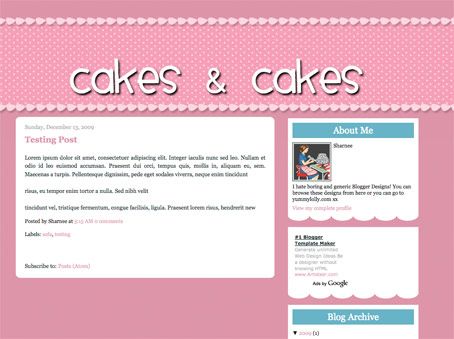
      Cakes & Cakes - 2 Column Template - why not make your own funky header?


      click for a live preview

      If you want to make your own header, go right ahead (you should make a transparent PNG file). I made an example that you can see how it may look here:


      Make my own header?

      To successfully make your own header, follow the following guides:
      • Make the header a transparent .png file (so you can see the spotty bg behind it)

      • You can make transparent pngs with my favourite online image editor Pixlr (yes, it's FREE and quite comparable to Photoshop).

      • You want to allow about 100px to 150px transparent "padding" above the text (within in the image I'm talking) so that it's going to be aligned within the spotty bit. If you don't put this padding in and try to insert the header image, it's not going to be in the right place and will look WEIRD! I hope that makes sense, leave me a comment if it doesn't and I'll try to explain more.

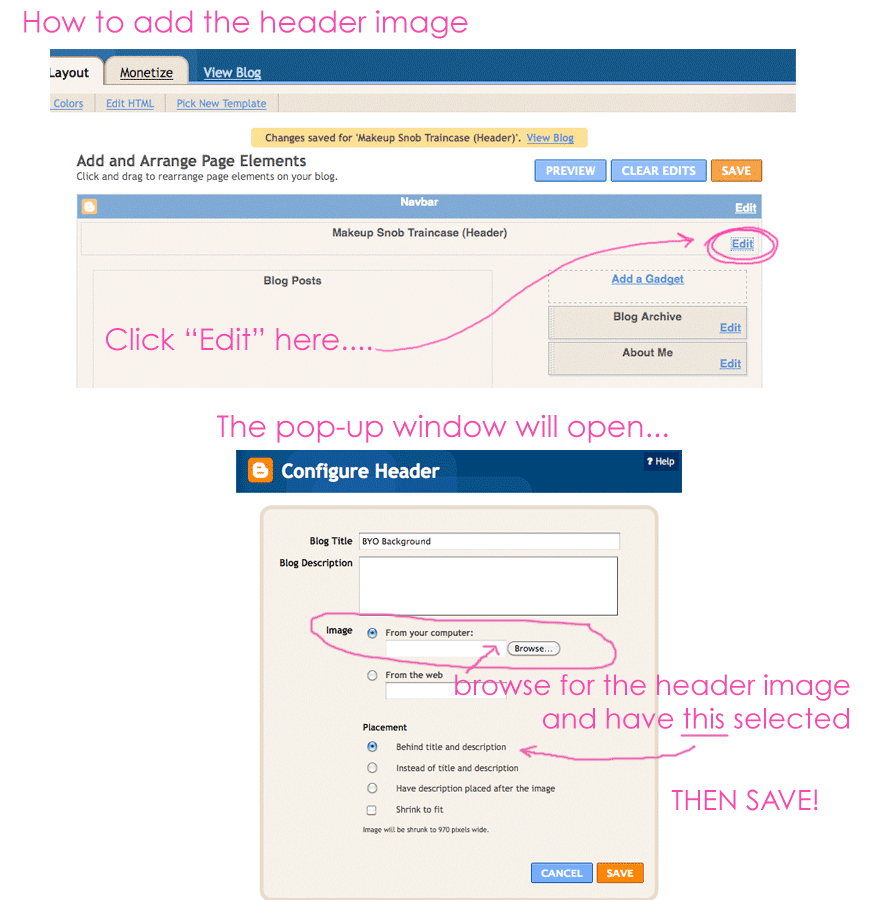
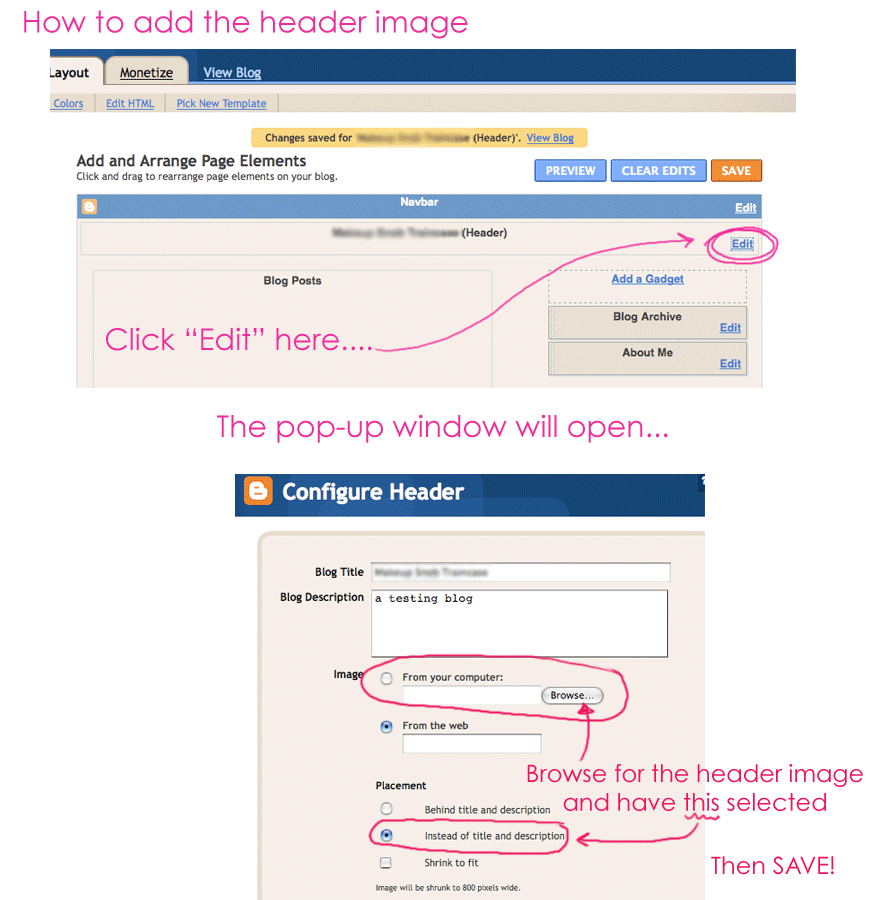
      • As always, upload your header image by clicking on: LAYOUT > PAGE ELEMENTS and then clicking "Edit" in the header area. You want to upload your header image, but ensure you DON'T HAVE "shrink to fit" selected. Also make sure you HAVE "instead of title & description" selected.
      Click here for visual instructions (much easier to understand). Enjoy.

      Sunday, 14 March 2010

      Excuse Me, I'm Fancy - Blogger Template


      (click image above for a live preview)


      STOP THE PRESS!

      Why not edit the header image and get something a bit spiffier?

      I have included the blank .jpg image in the zipped folder so you can add your own title/description in whatever font you like.

      This is, in a nutshell, what you have to do:

      1. Open the header image in your graphics program*. Add your own header title text/description. Save this image.

        I came up with this:


      2. Go to LAYOUT > PAGE ELEMENTS and click "Edit" in the header area. You are basically going to tell the blog to show this new image in stead of your boring old plain text header! Click image below for a grab on what to click:


      3. Done!


      * You don't need Photoshop (or such) any more because there's something called Pixel Editor which I seem to have within my Firefox Browser. I have no idea if this is now included in Firefox or if I installed the plugin. When I right click on an image, one of the choices is "Edit Image" and when I click that, it brings up a very 'Adobe' inspired editing window:


      It looks pretty freaking sweet.