Showing posts with label sweet. Show all posts

Friday, 25 February 2011

Orange Love Letter (more colours coming soon!)

Wow, I love this template, I really really like it!  Click here to go and have a look - it's got a delightful scalloped edge with tiny hearts and also a banner for behind the date.

Isn't it lovely?

If you like it or use it, let me know - I'd love to see it in action!
xx

Friday, 16 April 2010

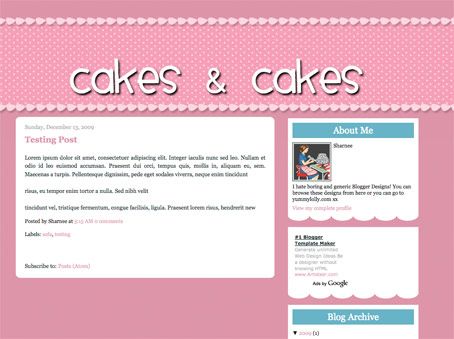
Cakes & Cakes - 2 Column Template - why not make your own funky header?


click for a live preview

If you want to make your own header, go right ahead (you should make a transparent PNG file). I made an example that you can see how it may look here:


Make my own header?

To successfully make your own header, follow the following guides:
  • Make the header a transparent .png file (so you can see the spotty bg behind it)

  • You can make transparent pngs with my favourite online image editor Pixlr (yes, it's FREE and quite comparable to Photoshop).

  • You want to allow about 100px to 150px transparent "padding" above the text (within in the image I'm talking) so that it's going to be aligned within the spotty bit. If you don't put this padding in and try to insert the header image, it's not going to be in the right place and will look WEIRD! I hope that makes sense, leave me a comment if it doesn't and I'll try to explain more.

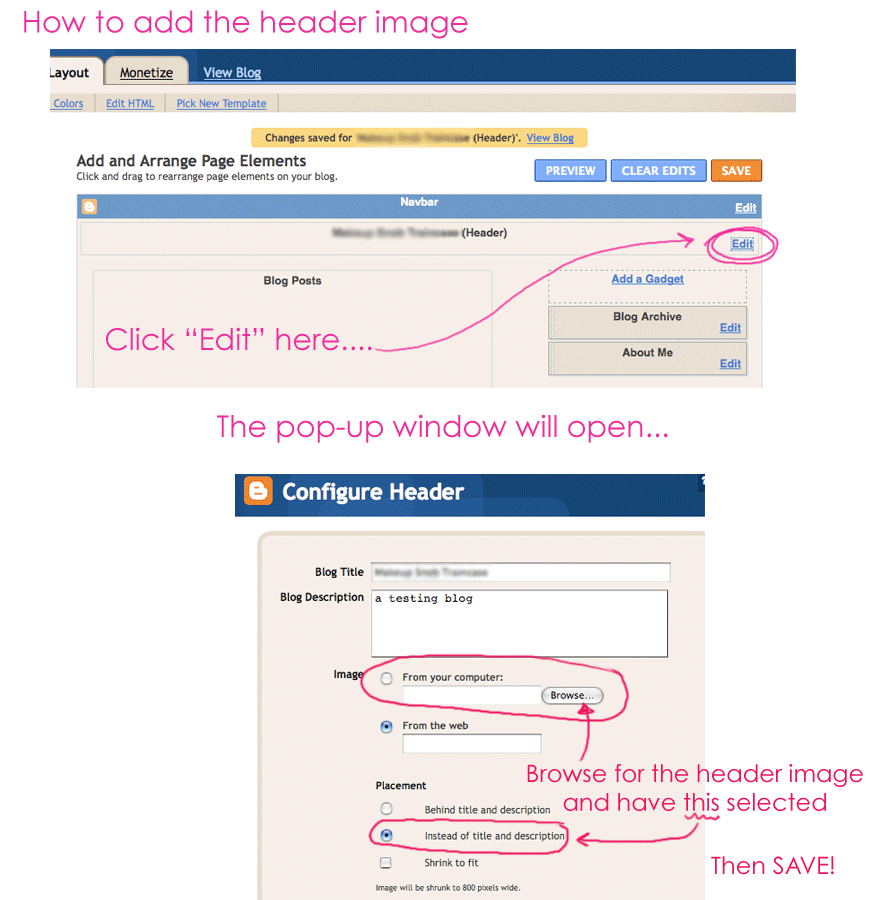
  • As always, upload your header image by clicking on: LAYOUT > PAGE ELEMENTS and then clicking "Edit" in the header area. You want to upload your header image, but ensure you DON'T HAVE "shrink to fit" selected. Also make sure you HAVE "instead of title & description" selected.
Click here for visual instructions (much easier to understand). Enjoy.

Wednesday, 25 November 2009

Temps Heureux - subtle, lovely (and don't tell anyone got the name from a teaspoon I bought in Japan)

Here is a template which is quite subtle yet lovely. I like the colours a lot (I thought about using pink text but decided on green for the headers - of course this is changeable from within the "Fonts & Colours" area so you can alter this to be whatever you want. I also think that orange would look lovely).

The frame/doodle in the header area is by the exceptionally talented Jen Furlotte at pixelsandicecream.com (possibly one of the best URLs ever!) and I full advise you to go and check out her extremely well priced graphic goodies! *sigh* I love people who share! Enjoy.

click for a live preview


Please back up your widget data before installing a template!

Sunday, 26 July 2009

Candy - Yum Yum - Free XML blogger template


click for a larger preview


The design works with "new" blogger - ie: it's an XML template. Please ensure that you backup your widget data, as installing a new template will wipe/erase your current widget content.

Please note that the header image of the candy is by:
I love it!

Monday, 20 July 2009

LolliPopper - free XML Blogger template

Here is a delightful lollipop themed blog template (header image by Flóra at Flickr.com - CC 2.0) and I adore it! There are quite a few changeable elements to this design - the border colour (pink the example), the background (grey in the example) and the inner blog colour - below the header image (white in the example) are all changeable. So you can make this template as bright as you like! Enjoy!


click for a live preview


The design works with "new" blogger - ie: it's an XML template. Please ensure that you backup your widget data, as installing a new template will wipe/erase your current widget content.

Sunday, 14 June 2009

This Little Piggy - free XML template

There are so many weight loss blogs out there so I thought I would try and make something to offset that! Haha, so here is a blogger template that embraces my inner piggy :-) This also has a navigation bar (instructions to change these links are within the blog code >> just go to Layout > Edit HTML and scroll down to near the end to change the links). More detailed instructions on what to do can be found here. Enjoy!

Oh, and I have made the nav bar colour changeable from within the Fonts & Colours area. Hoorah.


click for a live preview

The design works with "new" blogger - ie: it's an XML template. Please ensure that you backup your widget data, as installing a new template will wipe/erase your current widget content.

Monday, 27 April 2009

Cat Napper - free XML template

Here's a super cute blog template with your own navigation bar. The "home" link is already working, and there are instructions in the code, but here's how to add your own links:
  1. Log into blogger. Click on "EDIT HTML"

  2. Scroll down the large box of code until you see the following (it's near the end)

    <li><a href="'/'">Home</a></li>
    <li><a href="'#'">Link Here</a></li>
    <li><a href="'#'">Link Here</a></li>
    <li><a href="'#'">Link Here</a></li>
To add your own links:
replace the "#" symbol with your link URL and then edit the "Link Here" text to be the name of your link (see colour coding below). So if you wanted to put a link back to me, this is what you'd change one of the lines to be:

<li><a href="'http://www.yummylolly.com'">Yummy Lolly</a></li>

You can remove or add any lines as you wish. You just have to add them before the </ul> code.
Let me know if you have any questions.


click for a live preview

The design works with "new" blogger - ie: it's an XML template. Please ensure that you backup your widget data, as installing a new template will wipe/erase your current widget content.

Thursday, 27 November 2008

The Owl and the Pussycat - XML blogger template

I adore this dingbat font (ding delights) and wanted to make a template that was quite cute and not too serious, so I decided on this one - almost forgetting that the owl and the pussy-cat were in a "pea green boat"! Whoops. Luckily I remembered in time and their boat colour was salvaged! I don't know if the cat in the story was ginger, but my favourite kind of kitten is a ginger one!


click for a live preview


The design works with "new" blogger - ie: it's an XML template. Please ensure that you backup your widget data, as installing a new template will wipe/erase your current widget content

Enjoy!

Wednesday, 12 November 2008

Cookie Man - free XML blogger template


click for a live preview

The design works with "new" blogger - ie: it's an XML template. Please ensure that you backup your widget data, as installing a new template will wipe/erase your current widget content.

Sunday, 2 November 2008

Sugar Sugar - XML Blogger template - DIY header image Blogger template


(click for a live preview)

The design works with "new" blogger - ie: it's an XML template. Please ensure that you backup your widget data, as installing a new template will wipe/erase your current widget content.
PLEASE NOTE: your blog title and description WILL NOT SHOW UP. If you want your own header title to be visible then you'll have to edit the header image. I have included a PDF with instructions on how to replace the header image - alternatively you can leave it as it is and it will look the same as the live preview (the header will say "Sugar Sugar").

The header font is Black Jack and the description font is Rickles.

Saturday, 16 August 2008

Date Night - free XML blogger design

Here's a cute design with the retro woman fixed into position (bottom left corner). If you have a super narrow screen resolution then it might look too squashed, but test it out for yourselves with the below testing blog...


(click for a live preview)
  • To download the xml template: click here (zip folder)
  • Preview the site here
  • Need help installing this? Click here

Thursday, 31 July 2008

Blossoms - free XML blogger template


(click for a live preview)
  • To download the xml template: click here (zip folder)
  • Preview the site here
  • Need help installing this? Click here
I had a request a little while ago asking for something with some pink blossoms on it and found this gorgeous public domain image of these pink flowers. I hope you enjoy...

Thursday, 15 May 2008

Mode Parisienne - free XML blogger template


(click for a live preview)
  • To download the xml template: click here (zip)
  • Preview the site here
  • Need help installing this? Click here
Please note that the buttons were created by me and I do not give anyone permission to use them for any other public/commercial projects, except this blog header. You may not use the buttons in other graphics, on business cards or for digital scrapbooking. You may use them for personal projects with no commercial or public (including internet) purpose.

I have included a PDF with instructions on how to replace the header image - alternatively you can leave it as it is and it will look the same as the live preview (the header will say "Mode Parisienne").