Showing posts with label info. Show all posts

Tuesday, 25 January 2011

The best and most exciting news about using different fonts in your Blogger template! {aka: I am breaking up with Verdana!}

A while ago I posted instructions on how to use the Google Fonts in your blog.
It worked perfectly and wasn't that hard to do (and looked sweet!).

In case you did not know, these Google Fonts are now appearing in the "Template Designer" area of your Blogger Dashboard.


What does this mean?
Now you can use some awesome fonts in your blog (bye byeeeee arial!) and you don't need to know or modify any code, it can all be done with the click of a mouse.


Who can use it?
Well, everyone with a Blogger blog I assume. What you DO need to know is that if you have a blog template with the font types already hardwired into the blog html/css code, then you probably won't be able to use this feature until you have modified the code.
That really isn't that difficult to do and I will write a tutorial soon.

Some of my templates She May Adore Me, BYO Background, Rain Rain Go Away - some of my most recent templates - have the font type of the blog header (and possibly the sidebar headers) pre-determined in the code. So trying to change them in the method I have outlined below, will not work.

Never fear - I can re-write these templates to include this new functionality which will mean you will be able to select different fonts easier.

What this DOES mean though - that most of you can start changing fonts now!


Can I use any font I want?
No. You can only access the fonts in the Google Font Directory (of which there are now quite a few)!


OK OK, so how do we do it?
Log into your blogger dashboard. For this example I am going to use the Holiday on Me template:


Yes, lovely, but what happens when you don't love Georgia anymore?


Click on DESIGN and then the TEMPLATE DESIGNER tab:


(you may not have known about this part of Blogger before!)

If you are using a generic template from Blogger, you can probably control most of these tabs - background, widths etc, but if you are using one of mine, the one you want to click on is "ADVANCED" (see below) which is where the fonts, the colours and the font sizes can be controlled.


Again, please remember if any font or colour or font size is written into the code of the blog template, you won't be able to change it here.

So since I am changing the "Holiday on Me" template, I DO have control over which font I want throughout the blog.
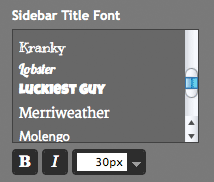


Now you will see that there are a lot more fonts to chose from. You can even make them bold, italic and change the size.

Select which fonts you want, pick the size and you are sorted!

Some fonts are linked - ie: the same font may be used in the sidebar header and the header of the blog. The reason for this is that they have the same code in the blog. If you want them to be different you will have to change the code.

I did notice that some fonts did not show up in the live preview (but they do show up when you click save and view the blog).
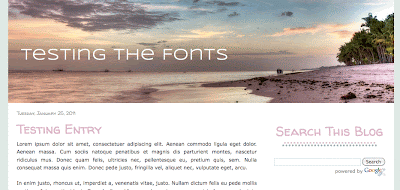


This is what I came up with (ok, maybe a little boring)!

If you have any questions, please let me know.

In a nutshell: THIS IS VERY VERY EXCITING! Previously it was only open to those in Blogger Draft but now it's open for everyone! Read more on Blogger Buzz.

Saturday, 15 January 2011

A few random things.... (and a request for my readers - yes, YOU!)

Hi everyone, hope you all had a great Holiday Season and New Year!

I have a few random things to mention in this post, so please bear with me. Time permitting, normal programming will resume shortly.

I would love to write a few simple tutorials, so if you're a reader and have a good idea, please leave a comment and let me know what you'd like to know and I'll try and help. Of course I might not be able to explain everything but hit me up with a comment and I will get started.

  • I have now opened a twitter account just for this site. HOORAY!
    I realise I had previously linked to my personal one before now but most of the time I complain about the public transport system in Melbourne (ie: nothing to do with Blogging). Therefore, I have made a dedicated Twitter account which I will post random Blogger points/info etc. Follow me: Yummy_Lolly

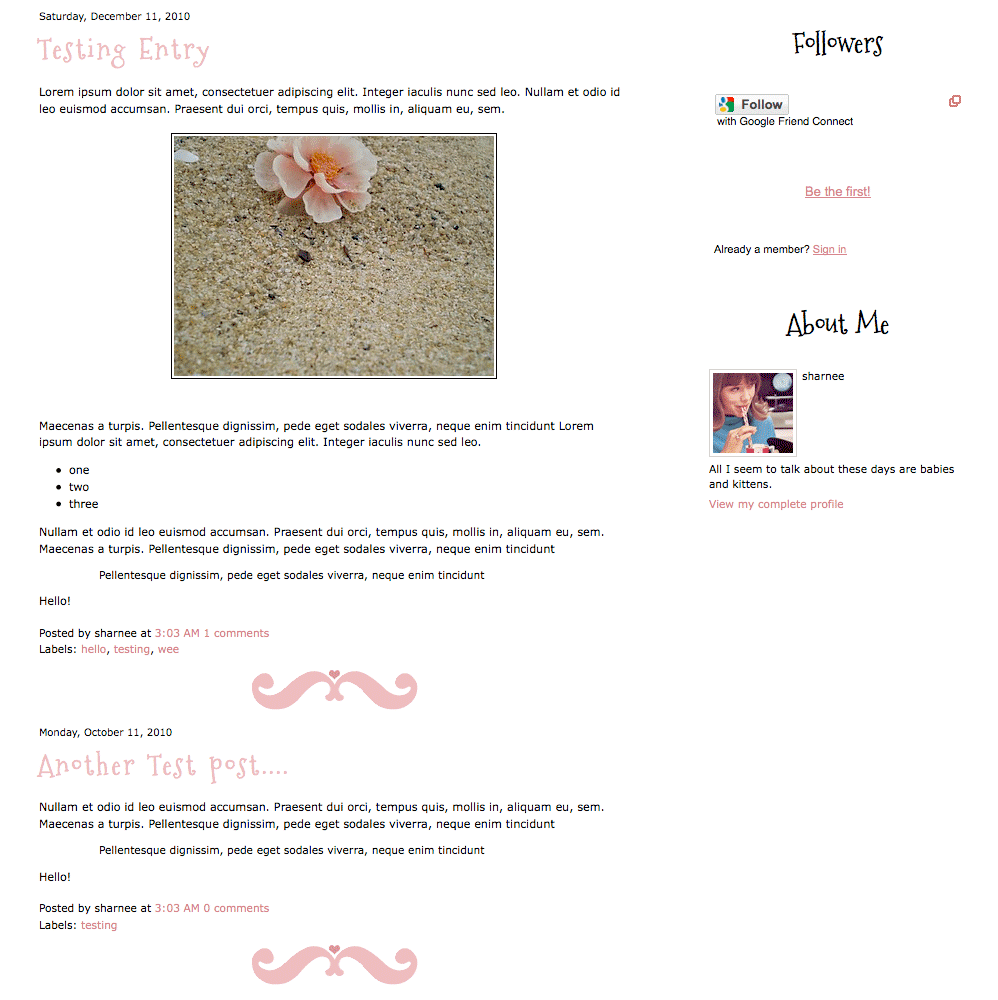
  • I had a request from Dana to make the "She May Adore Me" template with a post divider image - ie: between the posts. Yes, that is easily done, so what I have done is removed the image from under the sidebar headers and put it under each blog post.
    I guess I'm not 100% sure if that's what Dana meant but you can see what it would look like below:


    (click for a larger preview)


  • I also had a request to have the lovely font "Mountains of Christmas" used for block quotes from 'Owner of the Blog' (great name).

    So yes, as I am a nice girl, I have done that too:


    (click for a larger preview)

    You can download this code below:

Sunday, 17 October 2010

Using fancy fonts in your template! EASY PEASY!

Did you know that Google has a directory of fonts found at the Google Font Directory?

I DIDN'T KNOW THIS EITHER!!!!!!!!

This is very exciting news for those of us who want to make our blogs a bit different, especially when it comes to using non-boring fonts.

Georgia and Verdana, I love you guys but sometimes you bore me to tears! I knew there was a way to convert a font to a flash file and then use that, but that was a massive pain in the bum!

Anyway, here's my tutorial on how to use any of these fonts in your blog! Easily! Just two lines of text in the code need changing!

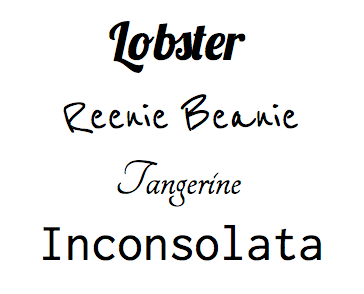
A list of fonts we can pick from can be found here. Take a look at some of these babies:


A few things before we start:
  • You should be somewhat comfortable about editing html. You don't have to be a professional but you need to be somewhat savy and not scared of html.

  • There are only a limited number of fonts. Sorry but you can't use that font you saw that time. You can only use the ones Google have to pick from. Don't worry, there are some nice ones and fingers crossed more will be added soon.

  • I DO NOT recommend using the font for your whole blog (c'mon, we don't want to make people's eyes bleed!) but I'll show you how to use it in the post title header of your blog posts. Infact I have been using Lobster font in the title post of this blog for a week or so now. Yes, click out of your reader and come and have a look.
    I would suggest using these fonts for the blog post title, the blog title or the sidebar header title.

Sharnee's very exciting tutorial on how to add fancy fonts to your blog post:


1) Click on the DESIGN and the then EDIT HTML tabs in Blogger

2) Download a copy of your current template & save it somewhere safe (naturally this is recommended any time you're making changes to your blog in case things go CRAZY).
Please be aware that for this tutorial I am using the generic Watermark blogger template but it should be pretty similar no matter which template you're altering.

3) Visit the Google Font Directory and pick which font you want to use: the site is here.
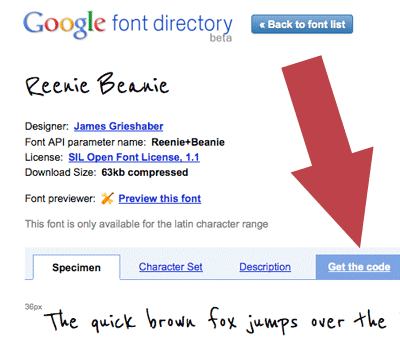
Once you have picked a font you want to use, click on it. I'm selecting "Reenie Beanie" as a test.
Click on "get the code"


Now you'll see two boxes of code.

Copy the top box of code.

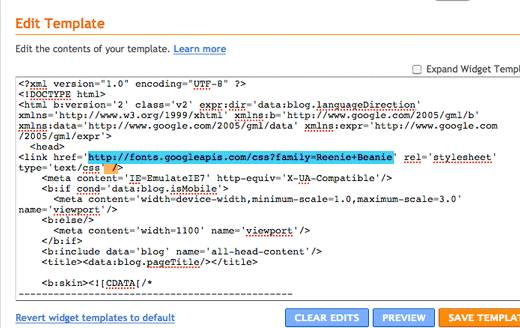
In the case of Reenie Beanie, that code looks like this:

<link href='http://fonts.googleapis.com/css?family=Reenie+Beanie&subset=latin' rel='stylesheet' type='text/css'>

Now, unfortunately when I try to use this code, exactly as Google have provided, I get an error. Don't worry, I'll explain how to fix it.

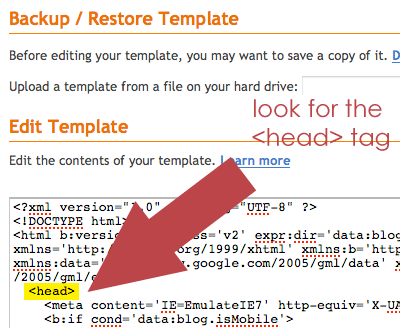
4) Return to Blogger and look to the box box of code. What we are looking for is the <head> tag


Paste the code directly below this (yes, you can hit return and put it on a new line)

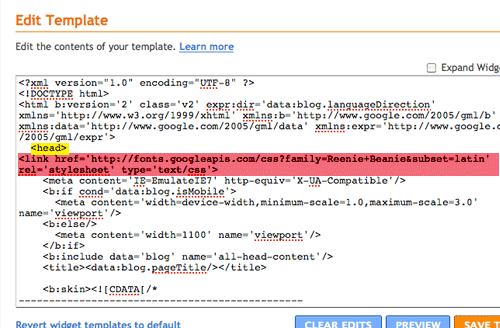
So now, this is how it looks for me:


(the pink being the code I just added)

Now here's the important parts to make it work:
  • put a space and then a '/' at the very end, just before the last pointy > bracket!
  • erase the &subset=latin bit
Now my code looks like this:


NOTE: there is a plus "+" sign between the words Reenie and Beanie. If you have chosen another font with a single word name, then it will just be the one word and no plus sign.

5) This tutorial shows you how to change the font used for the blog post title. Therefore we have to scroll down the code until we find the following:

h3.post-title {
font: $(post.title.font);
margin: 0;
}


Let's delete that font: $(post.title.font); line and replace with this:


font: 28px 'Reenie Beanie', arial, serif;


So that code now looks like this:

h3.post-title {
font: 28px 'Reenie Beanie', arial, serif;
margin: 0;
}

OK!

NOTE: You will be able to play around with the font size, as the above is using 28px as the size. Make it smaller, make it bigger. Try some different sizes. 28px is a bit small for me so I'm going to make it 36px.

(also, in case you were wondering, the "arial & serif" fonts are listed there for backup in case the computer can't read the fancy font, it will revert to a safe one)

Click PREVIEW

If it looks good then SAVE!

HOORAY YOU DID IT!


Now, I did this example on the Watermark template (using Bloggers fancy new template designer). If you are using one of my delightful templates - or another customised one - the title code you're looking for may be called something else. In my templates they are often called:

.post h3 {

Usually under /* ---( main column )--- */

Sometimes, the font size and the font type may be on different lines. You may have to delete both of these single lines to make it work.

Anyway, if you have any problems, leave a comment and let me know.

Remember, if everything gets screwed up then you did save your template for backup! Didn't you?

PS: I tried to write this as clearly as possible and I have probably made it seem incredibly challenging but it's actually really REALLY easy!

Saturday, 13 February 2010

Keep your widgets when changing your Blogger template! Woo Hoo!

I don't know if you have noticed but Blogger has introduced functionality to allow you to keep your widgets when you change your template!

WOW!

That was the biggest complaint that I heard from people who wanted to use my templates!
"Oh, I like the template but I don't want to lose my widgets / links etc".


SO WHAT'S THE DEAL?

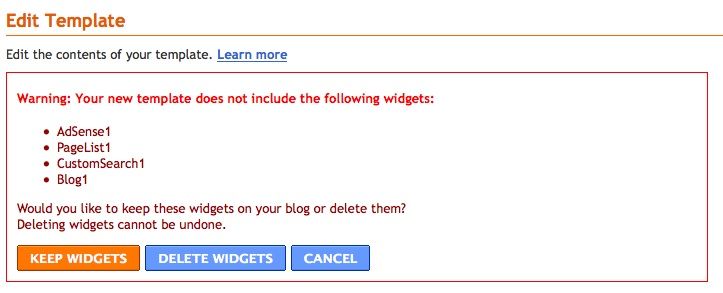
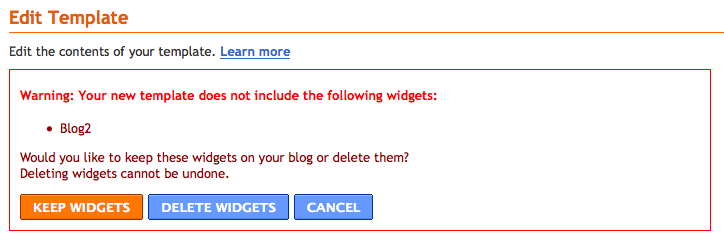
When you upload a template to your blog now, it comes up with a prompt as below:


If you click on 'Delete Widgets' then all your widgets (links, search bar etc) will be gone and you will have a fresh new blog with no dramas and a shiny new template. Except your widgets have gone.

If you click on 'Keep Widgets' then this is great because your current widgets will stay and the template will change! Just what everyone always wanted!


BUT....

(c'mon, you knew there had to be a but)

... sometimes, due to how things may be labelled in the code of the blog, you may get some hiccups occurring. I don't expect this to make perfect sense to you (and that's fine) but if you often change your template then remember this post and come back and visit it again if you have troubles.

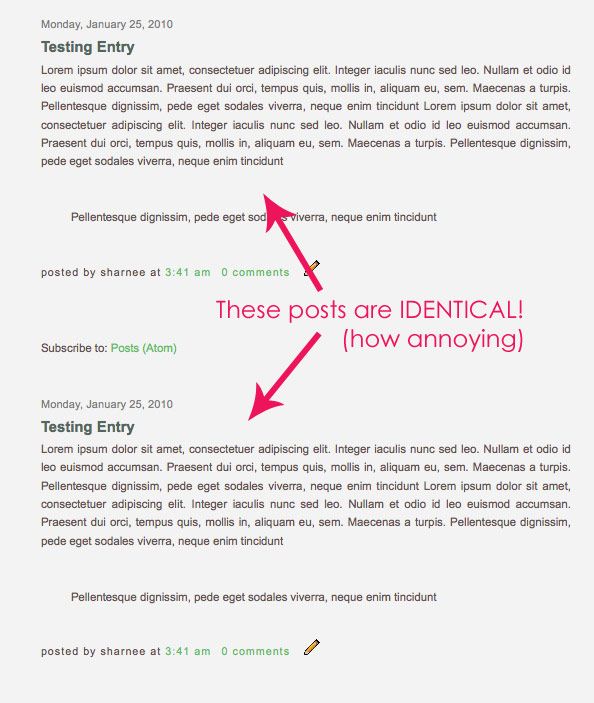
You may find something odd happens to your blog if you click on "Keep Widgets" like I did:


Yeah, a double up of posts!

How annoying!

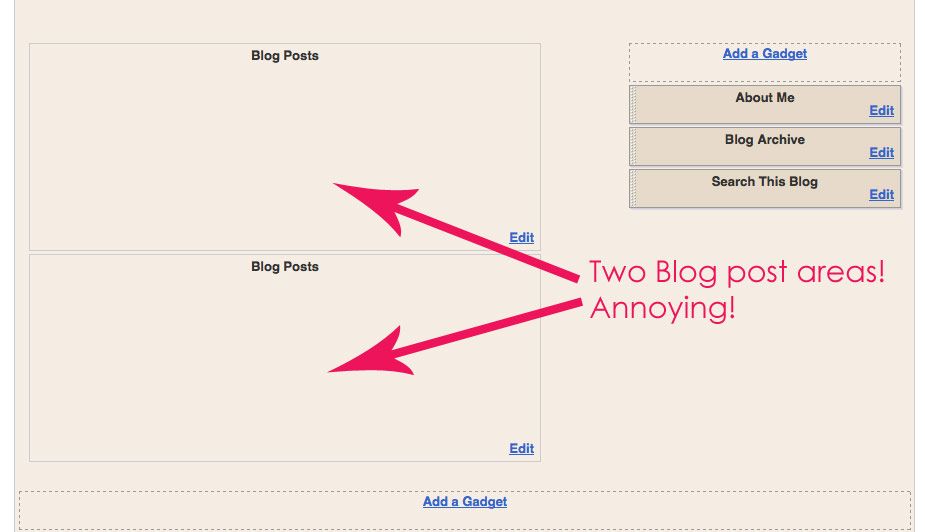
This is how it looks in the Page Layout area:


For some reason, the new template had a "Blog Posts" area, and you also kept the "Blog Posts" area from your old blog (each labelled with a different name).... so now you have two! Exactly the same! Arrr!


If you experience a problem like this, here is what to do:

1) Go to the Layout Edit HTML tab within Blogger

2) Make sure the "Expand Widget Template" button is NOT ticked (it will be easier on your eyes this way):


3) Scroll down through the code until you find the following (hint: it will be towards the bottom of the code):

</b:widget id='Blog2' locked='true' title='Blog Posts' type='Blog' />
(highlighted below)


THE IMPORTANT THING TO REMEMBER IS: that there are TWO 'Blog Posts' areas (see how one is labelled 'Blog1' and one is labelled 'Blog2' above?

I can identify which one I want to remove because of the first warning that came up when I changed my template (see below).


I can see that Blog1 was part of my blog before I changed the template (as indicated above) so therefore I need to erase 'Blog2' within the code.

This may be reverse for you, so please keep this in mind.

(In reality it may not matter which one you remove, I'm not sure at this time. But that's how you tell which one was part of your blog originally)

4) Go ahead and delete that line of code (in my case it was the pink highlighted line above)

5) Save.

6) On the next screen it will say something like this:


Click "Delete Widgets" because, no, we don't want our blog posts doubled up!

DONE!

I know this is going to be kind of confusing unless you actually have this problem, so please don't think too hard about it at this time. The information is just here in case you need it!

I am honestly not sure if any other things can be doubled up on like this can, but leave me a comment if you notice and I shall investigate.

I hope this makes some sense!

Sunday, 17 January 2010

yummylolly.com's FIRST EVER GIVEAWAY!

Hello!

This is a special post because I have one one-of-a-kind Blogger template to give-away to one lucky yummylolly.com reader. Yes, this is my very first giveaway! You will be the only person, ever, to have this template.

First things first - this is what the template looks like:


click to see a larger preview

HOW TO ENTER:
  1. You must be a yummylolly.com follower to enter (you can become a follower by clicking "Follow" in the right hand side bar there >>>>

  2. You must leave a comment on this post, just saying hello - tell me something funny, a joke, your favourite poem. Anything! You may only enter ONCE (ie: one comment per person, please).

    (Also, please include an email address I can contact you on (of course I recommend writing (it) like {dot} this.com to avoid any spamming of your email). I understand that not everyone wants to flash their email about, and that's fine, so if you don't leave an email then I will announce who won and you'll have to contact me! If you don't contact me, the winner will be re-drawn 3 days later!

THE RULES AND OTHER INFO:
  • Please note that this competition is for 1 x Blogger .xml template (not for any other blogging platform except blogger)
  • I will not make any changes to the design (colours etc) but I will include your blog name and description (in a font of your choosing) in the header area of the blog. This is the only alteration I will make.
  • Once I have emailed you asking for your blog title/description, I will make the header image for you and email you everything you need. This is to be installed by you but I can always help out if you need it.
  • I will host the image files for you.
  • One entry per person. Multiple entries will not be counted.
  • Once a winner has been emailed, if I do not receive any communication from the winner in 3 days, I will choose another winner.
  • A winner will be chose at random by selecting a comment number from random.org.

This will be drawn at 12 noon (Australian EST) on January 26th!


{If you don't like this template I am giving away, don't fret. I hope to do this once a month or so so there might be a design you like next time}

Tuesday, 22 December 2009

Almost 1000 Google Followers! Thank you, thank you!

Hello!

I just want to write a post saying that I've almost got 1000 Blogger Followers and that BLOWS MY MIND COMPLETELY!

Thank you to everyone who comes to my site (and stays for more than a second :D), thanks to those who download and enjoy my templates, thanks to those who take the time to email me and say thanks - that makes my day! I don't always have time to write back but I appreciate it so much! Thank you to you all. I enjoy doing this so much and I'm always happy that others can get enjoyment out of it too.

I have had a busy busy year! (I bet you have too) and I haven't been able to post many things of late due to everyone in my family having the flu (except me! ha!) and being in the process of transferring everything to my new harddrive. So things have been painfully slow.

This may be my last post for the year (boo!) but I will be back as soon as possible with more designs (yay!).

I hope you are well and if Christmas is your thing, I hope you have a very very merry one. If it isn't your thing, then I hope you still have a good time over the holiday season.

All my love,
Sharnee

Wednesday, 2 December 2009

Hey, you! Get ride of that horrid blue Blogger Navbar!

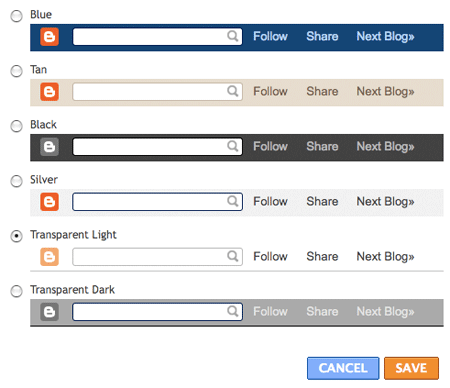
Have you noticed that the Blogger navbar is now more customisable? (well, in an ultimate world I could select the background colour myself!) but now there are more options than the horrid blue and tan!

{yeah, a lot of people remove/hide their Blogger navigation bar but I find it quite useful for searching and "following" a blog, and I'm always a bit bummed when it's removed. So there!}

My personal favourite is the Transparent Light - which means you can see the background pattern (or colour) behind it. See what I mean on this Christmas Baubles template. Cool, yeah?


You can find this feature under the LAYOUT > PAGE ELEMENTS (click on "Edit" in the Navbar area and a pop-up window will open).

A lot of you may have known about this but for those who haven't - enjoy!

Monday, 30 November 2009

How to add a favicon to your Blogger blog

Someone left me a comment asking for a tutorial on how to add a favicon to their Blogger / Blogspot template.

Now if you don't know what that is (you may not, depending on what type of browser you're using). It's the little icon in the menu bar - and bookmarks folder, etc. Read about Favicons on Wikipedia here.

Here is what my favicon looks like:


How to make one:
For best results I recommend using a square image to start with (as it will be scaled down to {usually} 16x16 pixels). If you want a transparent favicon, you should use a GIF or PNG file with transparent background.


Where to generate a favicon?
There are many sites out there where you can upload an image from your computer and a favicon will be generated for you (see below for a site I recommend).


Where to host a favicon?
A favicon needs to be hosted somewhere.

Unfortunately the favicon file is an .ico file type that many free image hosts do not support :( I did some quick research and found a lot of free favicon hosts no longer exist. I found one favicon generator {IconJ} that will not only generate the favicon, but also HOST it for you too!

IconJ
will generate the icon and supply you with code you need to imput into Blogger. I'm not affiliated with that site in any way - there may be better places out there - but I think they seem to be an easy-to-use site. And more importantly, it seems they will HOST the favicon without you having to sign up or pay!


So, what do you have to do?
  1. Start off with an image (as previously mentioned, square is best)

  2. Visit IconJ and upload your image - once uploaded you will see a notice like this:


  3. Copy and paste the supplied code.

  4. Log into Blogger. Go to the LAYOUT > EDIT HTML tab

  5. In the large box of code, scroll down (or search) for the following code:

    ]]></b:skin>

    </head>

  6. Paste the code you copied from the IconJ site in between the above tags (if it doesn't look exactly like that, don't worry - the most important thing is to post it just above the </head> tag! It will now look something like this:

    ]]></b:skin>
    <link rel="shortcut icon" href="http://YOURICONADDRESS.ico" />
    </head>
(the red text above indicates the new code you have just added - this is just sample text, yours will be different of course!)

Click on "PREVIEW" and your new favicon should be displayed in the preview of your site (assuming of course you have a browser that supports favicons).

If it all looks OK, click "SAVE".

Let me know if you have any questions, but that works fine for me!

PS: It is probably worth noting that IconJ is a free host and therefore may go down at any time - or your icon might suddenly disappear (and there's really not a lot that can be done since it's free and all). If you have another similar site, let me know in the comments section.

Wednesday, 14 October 2009

Oi, you! Click out of that reader!

So if you read this blog in Google Reader (or similar) then you are missing out on seeing some serious colours right now. Yes, I have re-designed Yummy Lolly - so click out of that reader and give your eyes a treat for once! Your eyes, they are starving!

If you've been coming here for a little while then you'll know that I've had the same font in the header for aggggges. I love it! It's probably one of my most favourite fonts ever and I am a big jackass who's never stopped to thank the wonderful designer of the font - because you definitely should know who designed it!

Thank you, Lauren from Nymphont, thank you!The font I'm using is called "LT Chickenhawk"

You should all head over to her site and see what goodies she has over there!

Monday, 8 June 2009

Changing Fonts in your blog title posts! YES, it's possible!

I have to share this with you because some people have asked me about it in the past and I wasn't sure if it was possible!

YES, you can change the fonts of your blog entry titles - and sidebar headers too (I mean FANCY fonts and not just boring old generic fonts!). I found a link via Husdon's blog (thanks!!!) which shows how you can use fonts in your blog... kind of Wordpress style (but a bit different)! The tutorial can be found >> here at Kevin & Amanda's website (they also have some GORGEOUS handwriting fonts! WOW!).

BUT.... please be aware of a few things:
1) You will need to be comfortable editing and changing html and code within your blog and this may be quite tricky for a beginner.

2) You will have to have somewhere to host the files (but there are free hosts available)!

3) It does not seem work with IE5.5 or IE6 (that's the case on the computer I tested it on anyhow).

What excellent stuff! I hope some of you may find it useful!

PS: re Internet Explorer - I try not to get sad when I see visitors using IE5.5 and IE6 but c'mon -- if you're using those, you really are missing out! They are up to IE8 now! Or.... you can try Firefox (which is my personal favourite!).

Wednesday, 6 May 2009

You learn something new everyday (apparently)!

Ok, so here are three little things for you guys:
  • BLOG BULK - this is an awesome site (seriously!) which gives easy to understand hints on doing various things in Blogger. Go to the "how to" section and be blown away by all the hints and tricks. It's very easy to understand (unlike some sites out there *ahem*) and I only noticed their site because they have a link back to me!

  • Thanks to one Tamale Chica ;-) for helping me research this one: If you're having troubles identifying your RSS feed, then this is the address:

    http://yourblogname.blogspot.com/feeds/posts/default
    http://yourblogname.blogspot.com/feeds/posts/default?alt=rss
    (obviously you have to replace "yourblogname" with your actual blog name :P)

  • And lastly, there is always the Blogger Help Forum to research any issues you might be having. If you are having any problems or have any questions with your blog, then I would advise you to search for the issue first -- someone else has more than likely experienced it before. The Blogger help forum is very useful but some of the "helpers" there can often be more rude than helpful (especially if you ask a question that's been asked many times before).
xxx

Wednesday, 15 April 2009

Welcome to yummylolly.com!!!

Welcome to yummylolly.com - free blogger .xml templates!

I have moved here from suckmylolly.com! I plan on focusing on making some awesome blogger designs so please bookmark this site, subscribe to the feed via Feedburner, or favorite this blogger blog because there will be some nice Blogger templates coming soon!! Of course there are already quite a few on this site >> visit the "Design Gallery" page now to have a browse!

This also may be one of the only times I ask for suggestions, but if there's a kind of template you'd like (I do not mean a celebrity or anime character blogger template!!!!!!) then let me know in the comments to this post and I might just take your advice ;-)

This will not apply to 99% of readers, but please remember that my templates are released under Creative Commons 3.0 license (you can use them commercially and they may be adapted) you may NEVER upload any of these templates to another Blogger template site!

xx

Saturday, 21 February 2009

Having problems installing a Blogger xml template? READ THIS

Sometimes, when you try and change your template, errors unfortunately occur.

There may be a few reasons for getting this error. I have done my best to outline (below) popular causes for getting an error when trying to install my templates.


1) CHECK YOU HAVE UNZIPPED THE FOLDER YOU DOWNLOADED:

I offer my templates as zipped (.zip) folders. The zip folder you download from suckmylolly.com contains a few files that have been compressed, to reduce their file size. Usually this folder will contain the blogger template - template.xml for example - my terms and conditions and an extra folder which contains the images. You cannot expect to upload this .zip folder and have it work - why?: because it's a compressed folder and not a blogger template. Uploading the .xml file will NOT (USUALLY) CAUSE ANY ERRORS but uploading the .zip file will not work. You must UNZIP this folder before installing the template.
If you don't know how to unzip files then I advise you to read this or this. I do not use Windows all the time but I believe that for Vista and XP - all you need do is to double click the file to unzip it (or right click).


2) TRY ANOTHER BROWSER:

I too get an unexplained error message sometimes when I test my templates. I have no idea why this happens but either waiting a little while or trying another web browser often fixes things.


3)
ERRORS WITH WIDGET LABELLING:

If you can *almost* install the template (ie: it asks you to confirm that you're about to delete your widgets but then when you click "OK" you get an error) - then you might need to change something in the code. This error occurs because the widgets are labelled incorrectly and Blogger gets confused when you try and change the template. I have no idea why this happens to some people and not to others but it's really quite simple to fix:

1. Before making any change, you should backup your current template. This can be done by going to "LAYOUT" >> "EDIT HTML" and then clicking on "Download Full Template".

2. Make sure you have some sidebar elements - eg: Profile, Blog Archive, Followers - before trying to upload the new template (this is so that you get the 'Widgets are about to be deleted warning').

3. Go to LAYOUT >> EDIT HTML and attempt to upload the new .xml template again. This will then bring up a page which lists the widgets about to be deleted - this is normal when installing a new template. You are then asked to confirm this step. Instead of confirming, follow the steps below:

4. Press Control+F (find function) and search for this phrase within the big box of code:


You should find some code such as these:


5. Change the number "1" in the code to be a "2".
ie: so it would now look like this:

Repeat this step for all these that you find in the code (change all the 1s to be 2s)

6. Confirm and save. This worked for me. I realise that it's quite scary to change your blog html if you're not experienced with html code, but it's quite a simple change and this is also the reason I recommend backing up your template before making any changes. Unfortunately things do sometimes go wrong so you should be prepared.

Of course I only recommend trying this last method if you feel comfortable altering the html. You may have trouble uploading any customised template unless this is altered.

Wednesday, 30 July 2008

Important Q&A:

Hi, just a quick note. I got this comment on one of my old posts and I thought it was an awesome question and I should share the answer with everyone:

Love your templates! A quick Q though: are the ads I see on the previews a part of the template? Will they appear on my blog if I use one of your templates?

Thank you for asking that!!

NO!!

There are no ads within the code of the templates!! If you use any of my Blogger designs then there will be NO ADS in there unless you chose to put them in yourself!!

In the past I have installed Blogger/Wordpress templates and the (naughty) designer has hidden the ad code in the template! I think this is disgraceful and I would never do such a thing! I do put google ads in my test blogs to maximize my revenue from these ads. I have to pay about $150+/year in hosting/domain costs per year and it's nice when you can make a few cents from the ads to help with these costs. That's the only reason I do it.

So please, rest assured that there's nothing at all in the templates that shouldn't be there!

Thursday, 17 April 2008

I know I just got back.....

Hi everyone! I know that I just got back from a big move, but I'm being whisked away on vacation tomorrow by my delightful boyfriend for a 2 week holiday to South East Asia. So, unfortunately this means I'll be away for 2 weeks and not able to check my mail, nor upload any blog templates until the first week in May.

So stay tuned for designs, coming soon! Apologies for going AWOL again (but there's enough in the archives for you to have a different blogger design every day for almost 4 whole months!).
Happy blogging!

xx

Tuesday, 25 March 2008

Bye bye for now!

Hi everyone...

I'll be out of range for a few weeks as I'm about to leave this country (in the next few days) and move back home.
More designs coming really really soon!

xx

Friday, 21 March 2008

Gah!

Sincerest apologies to everyone out there for not posting a design in the last week or so!
I'm in the last phase of what is known as hell aka: "moving overseas for the 4th time in 10 years".  Luckily for me I'm moving back home (and home is where the heart is after all) so things are CRAZY and exciting, all at once!

If I get time, I'd like to pop another design up before I disappear for a few weeks - please please don't forget about ol' suckmylolly.com - just know that I haven't abandoned ship.  What a perfect chance it would be to join the email newsletter to know when more designs are made.

(the links on the right there)

I've received an exceptional amount of love letters this week all telling me how much you like my designs and appreciate the fact that they're free - please know that I love and adore knowing that people get some joy out of something I've created.  Yes, even if it is a blog template - I love the fact you've gone to the trouble to tell me how much you like it!

It just makes it all worthwhile.
Thanks again, peoples!

Saturday, 9 February 2008

I interrupt normal programming...

...to say that there is some work being done on suckmylolly.com - please excuse any weirdness that you may experience over the next 2 days or so. It'll be up, bigger and better than ever - very soon. Templates can still be downloaded :)